3D Onion Skinning Interactive Documentation

How to Use This Documentation:

Explore main panels and sections
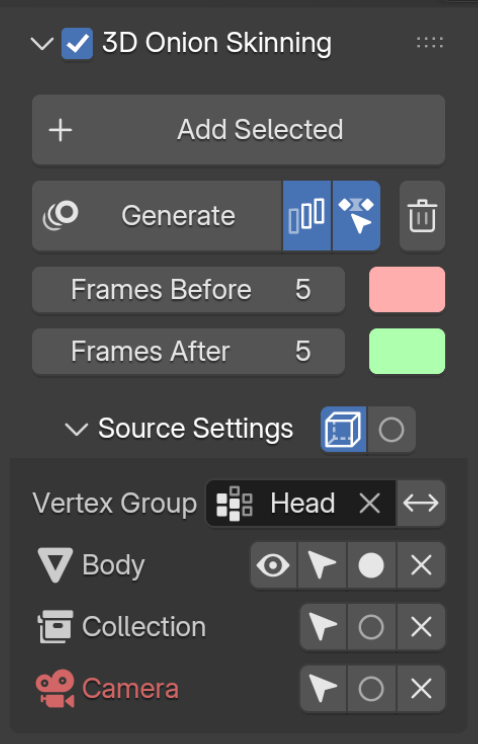
Proxify+ Addon Screenshot
Main Operational Functionalities Section
This area is where we start adding sources to become the generators of onion skinning feedback and how it will behave and look.
Sources Listing and Settings
For every source added, it will be listed in this sub-panel. User can define couple specific parameters per source and see at a glance non supported sources.
3D Onion Skinning
Header with a toggle to enable/disable the Add-on.
Add Selected
Add selected objects to Onion Skinning Objects list
Generate
Bake onion skinning to disk
Generate on Frame Change
Automatically generate when frame changes
Generate on Tweak
Automatically generate when animation data is tweaked (e.g. keyframes)
Clear Cache
Clear onion skinning cache
Frames Before
Number of frames to bake before current frame
Before Color
Color for ghosts before the generated frame
Frames After
Number of frames to bake after current frame
After Color
Color for ghosts after the generated frame
Source Settings
Sub-panel to list all the sources used for generating the onion skinning and their settings.
Backface Culling
Use back face culling to hide the back side of faces.
Toggle Generator In Front
Toggle 'In Front' display for Generator object
Vertex Group
Generate from the Vertex Group assigned on the list below
Bypass Object
Skip object from Onion Skin generation
Select Object
Select the respective object. Holding Shift or Ctrl will add to the selection.
Discard Onion Skin Source
Discard source from Onion Skinning generation
Type and Source Name
The icon shows the type of source followed by its name. When in red means that it is not supported type of source for onion skin generation.
Toggle In Front
Toggle 'In Front' display for Onion Skin object
Invert Vertex Group
Invert the influence of the selected vertex group.
Main Panels and Sections
Individual buttons and controls